


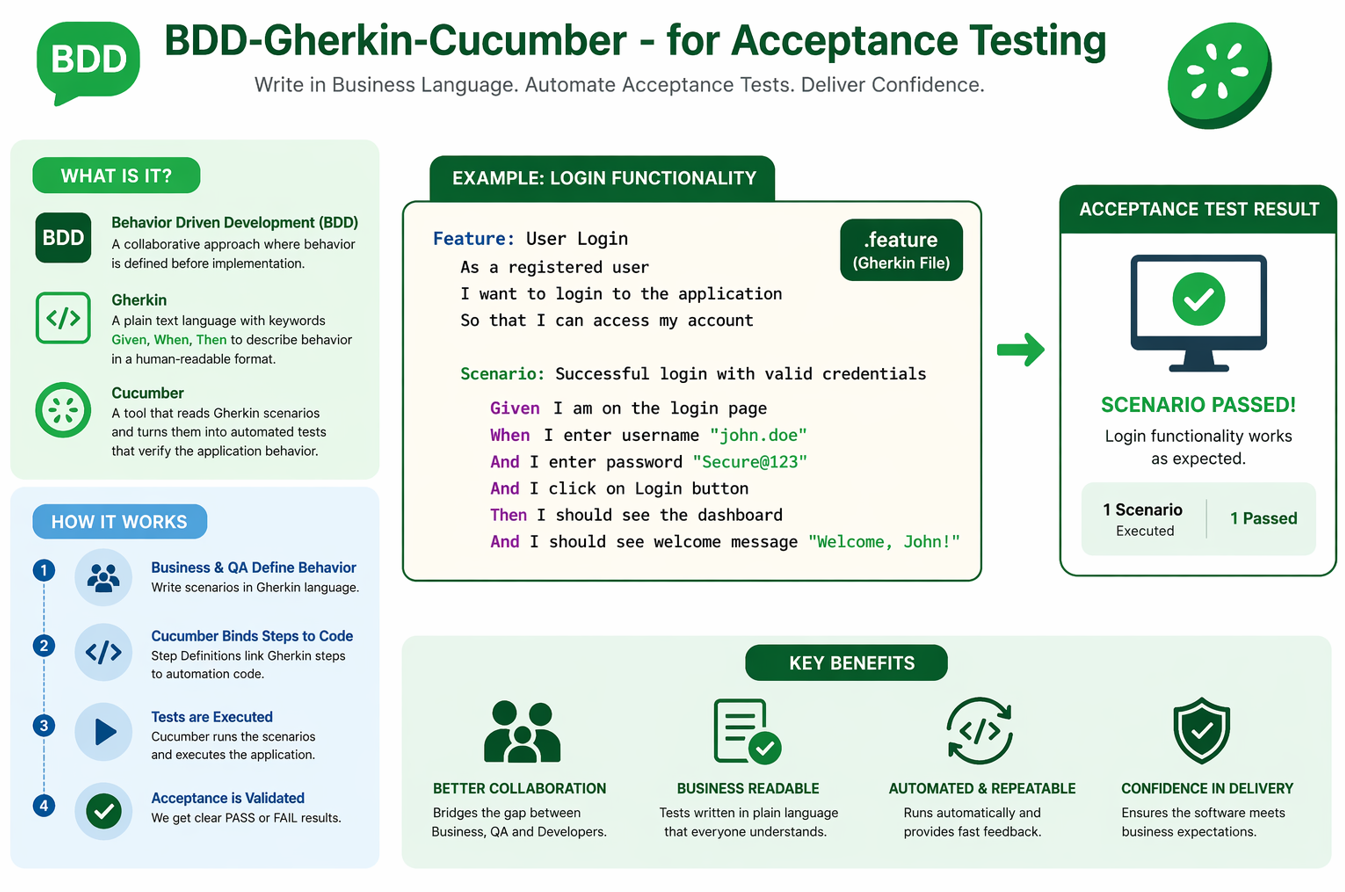
BDD-Gherkin-Cucumber are widely used in acceptance testing because they help teams write tests in business‑friendly language while still executing them with automation. Cucumber’s Gherkin syntax makes requirements readable and encourages collaboration between QA, developers, and product teams. This interview guide explains the most important concepts in simple language so you can answer confidently and apply them in real automation projects.
1) What is BDD, and why is it used in acceptance testing?
Behavior‑Driven Development (BDD) is a way of defining expected software behavior using simple, readable scenarios. It helps align business, QA, and development teams by focusing on user outcomes. In acceptance testing, BDD ensures that tests reflect real requirements. This reduces misunderstandings and improves collaboration.
2) What is Cucumber, and how does it support BDD?
Cucumber is a tool that executes BDD scenarios written in Gherkin. It links human‑readable steps to underlying automation code. This allows acceptance tests to stay readable while still being executable. Cucumber is used for web, API, and mobile testing with multiple programming languages.
3) What is Gherkin syntax?
Gherkin is the language used in Cucumber feature files. It uses keywords like Given, When, Then, And, and But. This format keeps test cases readable and easy for non‑technical stakeholders. Gherkin is the heart of Cucumber acceptance testing.
4) What is a Feature file in Cucumber?
A feature file contains high‑level scenarios describing a system’s behavior. It uses Gherkin syntax and is stored in `.feature` files. These scenarios define acceptance criteria for a product. Each scenario is mapped to automation code via step definitions.
5) What is a Scenario in Cucumber?
A scenario is a specific test case described in Gherkin. It represents a user journey or acceptance requirement. Each scenario includes Given, When, and Then steps. It is the smallest executable unit in Cucumber.
6) What are Step Definitions?
Step definitions connect the Gherkin steps to automation code. Each step has a matching method in Java, JavaScript, Python, or other languages. Without step definitions, the feature file cannot run. They are the “glue” between business language and execution.
7) What is the difference between Given, When, and Then?
Given sets the initial context or preconditions. When describes the action performed by the user. Then describes the expected result or outcome. This structure keeps scenarios clear and consistent. It also helps separate setup, action, and validation.
8) What is Scenario Outline?
Scenario Outline allows you to run the same scenario with multiple sets of data. You define placeholders in steps and provide data in an Examples table. This is used for data‑driven acceptance tests. It reduces repetition and improves coverage.
9) What are Background steps?
Background contains steps that run before each scenario in a feature. It is used for shared setup like login or navigation. This avoids repeating common steps in every scenario. It keeps the feature file clean and readable.
10) How do you organize feature files effectively?
Feature files should be organized by business modules or user stories. Keep scenarios short and focused on outcomes. Avoid mixing too many unrelated flows in one feature. Good organization improves maintainability and test clarity.
11) How do you avoid duplication in step definitions?
Use reusable step definitions and parameterized steps. Avoid writing slightly different steps for the same action. Good naming helps you identify reuse opportunities. This reduces code bloat and keeps the automation layer clean.
12) How does Cucumber integrate with Selenium or API testing?
Cucumber itself is not a browser tool; it needs libraries like Selenium for UI automation. For API testing, it can use RestAssured, Axios, or Requests depending on the language. The step definitions call these libraries. This allows full acceptance testing across UI and API layers.
13) What is tagging in Cucumber?
Tags allow you to group scenarios like @smoke, @regression, or @api. You can run specific tags during execution. This makes test runs faster and more targeted. Tagging is important for CI/CD workflows.
14) How do you run Cucumber tests from the command line?
You use the test runner in your language framework, like Maven or npm. For example, Maven runs Cucumber tests with surefire plugin. This enables automation in CI pipelines. CLI execution is essential for scalable testing.
15) How does Cucumber reporting work?
Cucumber can generate HTML, JSON, and JUnit reports. These reports show scenario pass/fail status and step execution details. Many teams integrate them with CI dashboards. Reporting is crucial for visibility in acceptance testing.
16) What are hooks in Cucumber?
Hooks are methods that run before or after scenarios. They are used for setup and cleanup tasks such as opening browsers or resetting data. Hooks reduce duplication in step definitions. Common hooks include @Before and @After.
17) How do you handle test data in Cucumber?
You can pass data using Scenario Outline, external files, or data tables. Data tables let you pass structured data into steps. This makes acceptance tests flexible and data‑driven. Proper data handling improves realism.
18) What is the role of Data Tables in Cucumber?
Data tables allow you to pass multiple values in a clean tabular format. They are useful for forms, bulk validations, and API payloads. Step definitions can parse these tables into objects. This keeps scenarios readable even with complex data.
19) How do you keep feature files readable for business users?
Use simple language, avoid technical terms, and focus on outcomes. Keep each scenario short and realistic. Use consistent Given‑When‑Then style. This keeps feature files usable for both business and technical teams.
20) What is the difference between BDD and TDD?
TDD focuses on writing tests before code, usually at a unit level. BDD focuses on behavior and business outcomes, often at acceptance level. BDD uses readable scenarios while TDD uses developer‑level tests. They complement each other but solve different problems.
BDD vs TDD (Quick Comparison)
Both improve quality, but they focus on different goals and audiences.
| Aspect | BDD | TDD |
|---|---|---|
| Meaning | Behavior‑Driven Development | Test‑Driven Development |
| Focus | User behavior & acceptance criteria | Code correctness & design |
| Audience | Business, QA, Dev teams | Primarily developers |
| Style | Given‑When‑Then scenarios | Unit tests before code |
| Tools | Cucumber, SpecFlow, Behave | JUnit, NUnit, PyTest |
| Outcome | Shared understanding of requirements | Better code structure and safety |
Quick Summary: BDD ensures the right behavior is built, while TDD ensures the code is correct and maintainable.
21) What is a common mistake in Cucumber automation?
A common mistake is writing technical, developer‑style steps instead of business language. Another is duplicating steps and creating bloated step definitions. Over‑using UI steps for API‑level acceptance can also slow tests. Good balance is key.
22) How do you structure a Cucumber project?
Typical structure includes feature files, step definitions, hooks, and runner files. Keep features grouped by module, and step definitions grouped by functional area. A clean project structure improves scalability. It also reduces maintenance as the suite grows.
Structure a Cucumber Project (Recommended Layout)
A simple, scalable folder structure for Cucumber automation projects.
Basic Folder Structure
src
 └─ test
    ├─ java
    │   ├─ runners
    │   │   └─ TestRunner.java
    │   ├─ stepdefinitions
    │   │   └─ LoginSteps.java
    │   ├─ pages
    │   │   └─ LoginPage.java
    │   ├─ hooks
    │   │   └─ Hooks.java
    │   └─ utils
    │       └─ ConfigReader.java
    └─ resources
        ├─ features
        │   └─ login.feature
        ├─ config
        │   └─ config.properties
        └─ testdata
            └─ users.csv
Why This Structure Works
- features → stores readable Gherkin scenarios
- stepdefinitions → mapping between steps and code
- pages → Page Object Model for UI maintainability
- hooks → setup/teardown logic in one place
- utils → config, helpers, reusable utilities
23) How do you handle flaky scenarios in Cucumber?
Flakiness usually comes from unstable locators, timing issues, or weak data setup. Add proper waits and reliable selectors. Avoid unnecessary UI steps when API validation is enough. Stability is more important than speed in acceptance testing.
24) What interview‑ready example should you explain confidently?
A strong example is a login + search + checkout scenario with data‑driven inputs. Explain how you mapped Gherkin steps to Selenium actions. Mention tags, reports, and hooks for setup. This shows end‑to‑end understanding.
25) Why is Cucumber popular for acceptance testing automation?
Cucumber makes requirements readable and executable at the same time. It bridges the gap between business language and automated testing. Teams can validate acceptance criteria directly. That combination makes it a top choice for BDD acceptance testing.
You can refer below short code snippets for understanding of Gherkin/BDD style and Cucumber codes.
Short Code Snippets: Cucumber + BDD/Gherkin
Small examples to help readers understand how BDD scenarios map to automation code.
1) Simple Gherkin Feature
Feature: Login

  Scenario: Valid user logs in
    Given user is on login page
    When user enters valid credentials
    Then user should see dashboard
2) Step Definition (Java Example)
@Given("user is on login page")
public void user_on_login() {
    driver.get("https://example.com/login");
}

@When("user enters valid credentials")
public void enter_credentials() {
    driver.findElement(By.id("user")).sendKeys("demo");
    driver.findElement(By.id("pass")).sendKeys("123");
    driver.findElement(By.id("login")).click();
}

@Then("user should see dashboard")
public void verify_dashboard() {
    assertTrue(driver.getPageSource().contains("Dashboard"));
}
3) Scenario Outline (Data‑Driven)
Scenario Outline: Login with multiple users
  Given user is on login page
  When user enters "" and ""
  Then user should see ""

Examples:
  | username | password | result    |
  | demo     | 123      | Dashboard |
  | wrong    | 000      | Error     |
4) Background Example
Background:
  Given user is on login page

Scenario: Login with valid user
  When user enters valid credentials
  Then user should see dashboard
And some JavaScript (Cucumber.js) and Python (Behave) versions –
Cucumber.js and Behave (Python) Snippets
Short examples to show how BDD steps are implemented in JavaScript and Python.
1) Cucumber.js Feature (Gherkin)
Feature: Login

  Scenario: Valid user logs in
    Given user is on login page
    When user enters valid credentials
    Then user should see dashboard
2) Cucumber.js Step Definitions (JavaScript)
const { Given, When, Then } = require('@cucumber/cucumber');

Given('user is on login page', async function () {
  await browser.url('https://example.com/login');
});

When('user enters valid credentials', async function () {
  await $('#user').setValue('demo');
  await $('#pass').setValue('123');
  await $('#login').click();
});

Then('user should see dashboard', async function () {
  await expect($('#dashboard')).toBeDisplayed();
});
3) Behave Feature (Gherkin)
Feature: Login

  Scenario: Valid user logs in
    Given user is on login page
    When user enters valid credentials
    Then user should see dashboard
4) Behave Step Definitions (Python)
from behave import given, when, then

@given("user is on login page")
def step_open_login(context):
    context.browser.get("https://example.com/login")

@when("user enters valid credentials")
def step_login(context):
    context.browser.find_element("id", "user").send_keys("demo")
    context.browser.find_element("id", "pass").send_keys("123")
    context.browser.find_element("id", "login").click()

@then("user should see dashboard")
def step_verify_dashboard(context):
    assert "Dashboard" in context.browser.page_source
Conclusion
If you practice these BDD-Gherkin-Cucumber interview questions with real scenarios, you will be ready to explain both the tool and the thinking behind acceptance testing. Focus on writing clean Gherkin, reusable steps, and stable automation logic. When you can connect scenarios to business outcomes, you stand out as a tester who understands real product value.
Discover more from Newskart
Subscribe to get the latest posts sent to your email.

Comments are closed.