


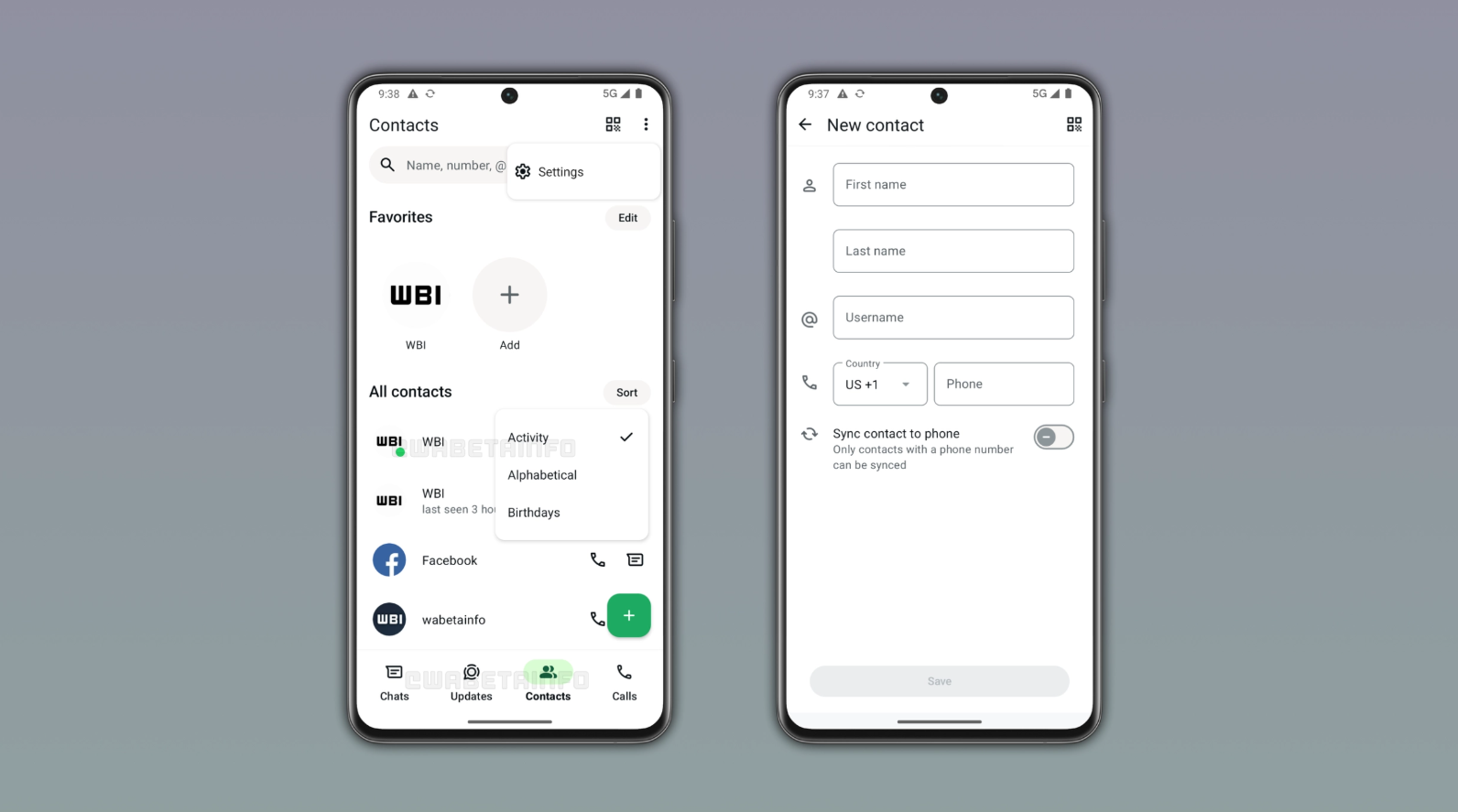
WhatsApp is testing another change to its Android app layout. A new Contacts tab is beginning to appear in the bottom navigation bar for some beta users, taking the place currently used by Communities.
The change may look small, but it could make everyday messaging quicker. Instead of searching through a long chat list to find someone, users may get a dedicated space to see favourite contacts, browse their contact list and check who is online.
What is the new WhatsApp Contacts tab?
The new Contacts tab is being tested with a limited number of WhatsApp beta users on Android. It sits at the bottom of the app and acts like a quick contact hub.
According to beta-tracking site WABetaInfo, the tab has a section for favourite contacts at the top, followed by a wider list of WhatsApp contacts. Users may also be able to sort that list by name, birthday or activity.
The activity option is perhaps the most useful part. It can place contacts who are currently online near the top of the list. For users who have not shared their online status, WhatsApp will continue to respect those privacy settings.
In short, the tab is not designed to change how WhatsApp messages work. It is meant to reduce the steps needed to start a new conversation.
Why is Communities being replaced?
WhatsApp is not removing the Communities feature itself. Communities help schools, housing societies, workplaces and other groups manage several related WhatsApp groups under one larger space.
Instead, WhatsApp has already added a Communities filter to the Chats section for some users. That means people can still find their communities without needing a permanent Communities button in the bottom bar.
With that shortcut available, WhatsApp appears to be testing whether the bottom-bar space can be used for something that more people may use every day – finding individual contacts.
This is still an experiment. WhatsApp is reportedly testing different layouts for different accounts, so some people may see changes involving the Updates or Meta AI sections instead.
What are the benefits for users?
The biggest benefit is speed. Imagine a person who has hundreds of chats, including office groups, family groups, shopping messages and old conversations. Finding one friend who is online may mean using search or scrolling for several seconds.
The Contacts tab could make that task much simpler. Users may be able to open WhatsApp, tap Contacts and start a chat immediately.
The favourites section can also be helpful for people who regularly message the same few contacts. Parents, business owners, students and professionals may find it easier to keep important conversations within quick reach.
WhatsApp is also reportedly including an option to add a new contact from this section. Users can enter a name, username and phone number, with the option to sync phone-number contacts to the device address book.
What it means for Communities users
People who use Communities often should not panic if the bottom-bar button disappears. The feature is expected to remain available through the Chats filter during this test.
However, the change may take some getting used to. Users who are used to opening Communities from the bottom bar will need to look for the filter in their chat screen instead.
This seems to be part of WhatsApp’s larger effort to make the bottom navigation bar more flexible. The company has been testing different positions for Contacts, Communities, Updates and Meta AI, so the final design may not look exactly like the current beta version.
When will it reach all WhatsApp users?
There is no confirmed public release date. The Contacts tab is currently rolling out gradually to some Android beta testers, which means even beta users may not see it immediately.
As with many WhatsApp tests, the feature could change before a wider release, arrive later on iPhone or remain limited to selected users for some time.
Discover more from Newskart
Subscribe to get the latest posts sent to your email.
